
Showing posts with label literacy. Show all posts
Showing posts with label literacy. Show all posts
Tuesday, 1 April 2014
Lego Inquiry with Lego Movie and Blocksworld
In Kinderland we've been inquiring about lego. We went to see the Lego Movie and yes, "everything was awesome!" After seeing the movie the kinders came up with wonderings such as, "how is it made?", "who invented lego?", "how do you make lego?", etc. We have used the iPads in researching videos and websites that can answer our wonderings. Our vocabulary has been expanding through these questions with words like, creative, manufacture, structure, foundation, etc. To encourage writing the rule is, if you want to save your lego creation for later than you need to write about it. Some kinders chose pencils and paper while other students chose to use the camera, video, or explain everything on the iPad. We take pictures and put them up on our lego documentation panel to show our learning. Students have been creating lego challenges and writing signs inviting other kinders to take up the challenge. A new to us app has been Blocksworld. It is similar to Minecraft in the sense that you can build structures, however geared to a younger audience. It uses 3D shapes and the students have been excited about creating and sharing their worlds with other classmates. They challenge each other's thinking continually and taking risks, and this app has introduced experimenting with 3D shapes. This has been a perfect lead into instructing 3D shapes informally in small groups and formally in Math. The Lego Movie app has been an exciting way for the kinders to explore their creating in story telling and cinematography.

Wednesday, 19 March 2014
Artist in the Classroom, shadow puppets, drama, visual arts, literacy, poetry, media, critical thinking, time sensitive feedback
In the month of February “Artist in the Classroom”
Shelly King came into my 5/6 classroom to work with my students. Students were creating shadow puppets and
then they were asked to work together in small groups to create a short
dramatic presentation. I decided that
this would be a good chance to bump up poetry reading in class so for the few
weeks before our first visit we read and shared lots of poetry. A great source for poetry reading is
poetry4kids.com. For the first 2 sessions students worked on creating their
characters and practiced reciting the poems focusing on voice and
movement. During the 3rd
session students we used the Ipads to record student presentations. Using the class created Success Criteria the
class (and the artist) provided feedback for each group. Students were given work time to use the
feedback and then present again. The
Ipads were used again to video the updated performance. It was really easy to see that students had
listened to and used the feedback to improve their presentations. Using video has definitely become an
important tool in our classroom. I was
able to watch the videos later and pull marks for drama, oral, visual arts, and
reading and most importantly, the problem solving and critical thinking that I
observed was incredible!
Friday, 21 February 2014
Padlet
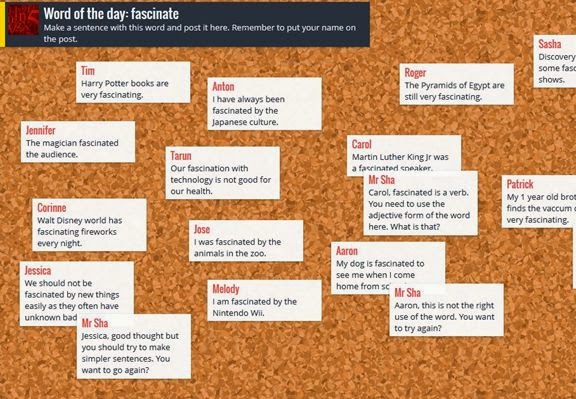
Padlet is an amazing learning tool. It is a website that allows anyone that types in the identical URL to write on a shared wall in real time. Padlet does not require a login or password; anyone can create a wall and anyone can write on it by using the unique URL given to the wall creator. One of Padlet’s greatest strengths is that it is relatively low-tech. It is not an app, any device that has an internet browser can interact with it. Padlet allows the teacher to export the wall in a variety of formats. As an assessment tool rather than taking an anecdotal record for participation it records what students have contributed and can be saved instantly to a single file for participation marks or levels if the response requested requires critical thinking. Padlet’s other great strength is that it gives students a forum to contribute towards a collective lesson without speaking in front of their peers.
One of the unique features that the app has is that the person who established the wall can set the background to any image. Students could then look at the image and describe an emotion or insight that the background has inspired. This image could also be a math problem to which students can submit an estimate or answer. The could also collectively annotate the work sample as part of consolidation. This app is also ideal for the co-creation of an anchor chart. Teachers could divide the class to limit the number of people working on each wall that they create or to have different themes for different walls. An example of this could be having half of the class work towards filling a wall with the positives of first contact for First Nations and the other half of the class working towards filling a wall with the negatives of colonization. Padlet allows for two organizational methods to be selected via settings. One is freeform which allows students to write anywhere they click, the other places each comment in order as it was made vertically. Padlet allows you to change to the latter after students have already made their post as a free-click comment to organize comments in a clear readable fashion.
A suggested accompanying app if students are using padlet with tablets is scan life (free). The wall has a share button which opens up a QR code. Once a student has scanned it they are instantly taken to the wall where they can open up the same QR code to bring to their peers. Where it may seem like an obstacle to get everyone to the same URL, the diffusion of using the QR code can happen very quickly. If older technology is being used the Educator can write the URL on the chalk board or e-mail it to students. That said it is highly unlikely but anyone could randomly enter that six digit code. It is for this reason that I would suggest turning on the moderator option (found under privacy in settings) in order to filter potentially inappropriate things from being posted by students in the class or others. With a moderator filtering what could potentially be posted on the Padlet wall students are provided with the opportunity to anonymously post questions which could be seen as a strength.
Padlet requires no login and an entire class can be working on the same electronic wall in real time within few short moments. As a teacher Padlet can be seen as an outlet allowing for independent thinking and allowing many students to express their ideas to the class quietly and simultaneously. All of these ideas can be exported neatly to a single file in a variety of formats to be read (I suggest switching the layout to “stream” for this) by the educator at their convenience rather than collecting 20 or 30 different pieces of paper. Padlet is a great tool that students can use on a wide range of technology.
Subscribe to:
Posts (Atom)